A recovery plan is more than just a document; it’s your documented playbook for restoring business operations and IT infrastructure when things go wrong. For small to medium-sized businesses and startups, this isn't just about disaster recovery. It's the bedrock of your operational resilience, a necessity for passing security questionnaires and achieving compliance with frameworks like SOC 2 or ISO 27001, and a surprisingly powerful tool for building the customer trust you need to close deals.
Your Blueprint for Business Resilience
Let's be blunt. For any growing business, especially in the SaaS and tech world, downtime isn't a minor hiccup—it's a direct assault on your revenue and reputation. A solid plan for recovery is what separates a manageable disruption from a full-blown catastrophe. It shifts your team's mindset from a panicked, reactive "what now?" to a proactive, structured response that minimises damage and gets services back online, fast.
This isn't just an IT problem to solve; it's a fundamental business function. Getting to grips with the importance of business continuity planning is the first real step in creating your blueprint. Without a clear plan, chaos reigns during a crisis, and people under pressure inevitably make critical mistakes. A documented strategy ensures everyone knows their role, what needs to be fixed first, and how to keep stakeholders in the loop.
This flow illustrates how you move from simply protecting assets to taking prioritised action and, ultimately, building trust with your customers.
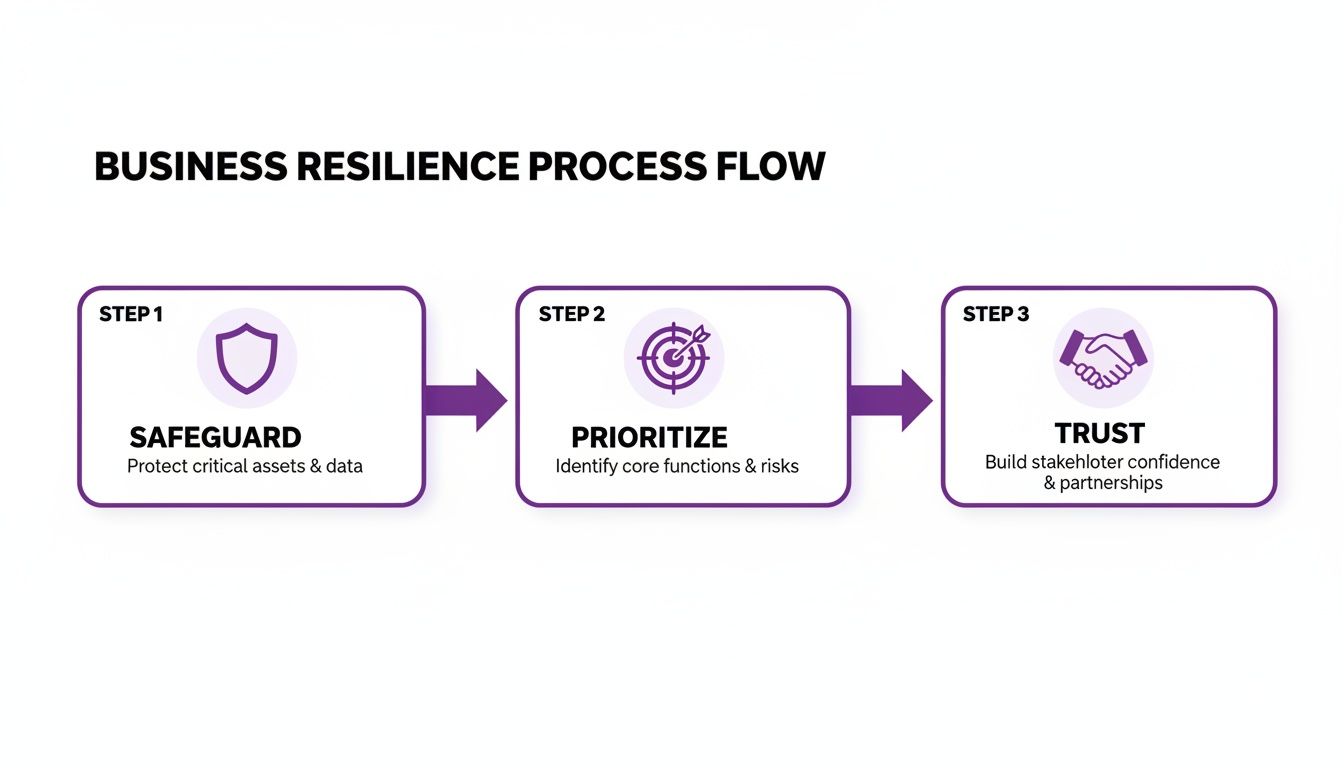
As you can see, a recovery plan isn't a dusty technical manual. It's a strategic instrument that has a direct, tangible impact on how customers see and trust your business.
Defining Key Recovery Metrics
Two core concepts really form the spine of any effective recovery plan, and you need to get them right.
Recovery Time Objective (RTO): Think of this as the maximum acceptable downtime you can stomach for a given system. It answers the question, "How quickly do we absolutely have to be back online?" Your critical production database might have an RTO of minutes, whereas an internal HR tool could probably wait a few hours.
Recovery Point Objective (RPO): This one is all about data. It defines the maximum acceptable amount of data loss, measured by time. It answers, "How much recent data can we afford to lose?" An RPO of one hour means that if the worst happens, you're prepared to lose up to 60 minutes of data created right before the incident.
These aren't just numbers you pull out of thin air. They should be directly informed by your customer SLAs, business priorities, and contractual commitments. Setting realistic RTO and RPO targets is the foundational step towards building a recovery strategy that actually works in the real world.
From Compliance Burden to Competitive Edge
For a lot of smaller companies, the initial nudge to create a plan for recovery comes from outside forces. You start getting tough security questionnaires from big potential clients, or you realise you need a certification like ISO 27001 or SOC 2 to compete. These frameworks, along with regulations like NIS 2 and DORA, all require you to have documented and tested recovery capabilities.
But here’s the shift in mindset every founder needs to make: Stop seeing this as a compliance checkbox and start seeing it as a strategic investment.
A well-crafted and tested recovery plan is an incredibly effective sales enablement tool. It's proof of your company's maturity and reliability. It gives prospects the confidence they need to sign on the dotted line, knowing you can protect their data and maintain service continuity.
When you can show you have a plan, you're directly answering one of the biggest unspoken questions in any B2B sales process. This doesn't just satisfy auditors; it accelerates sales cycles and turns a security task into a real competitive advantage. And platforms like Compli.st can help you centralise this proof, making it easy to showcase your resilience in a Trust Centre and fly through security questionnaires.
Defining Your Recovery Scope and Objectives
Before you can build a plan for recovery, you need to be crystal clear on what you’re protecting and why. A common pitfall, especially for startups and smaller businesses, is trying to protect everything equally. That approach is a surefire way to burn through resources and end up with a plan that buckles under real pressure.
Your first move is to pinpoint the mission-critical parts of your business—the processes, systems, and data you simply cannot operate without. If you’re a SaaS company, this goes way beyond just your main application. You have to map out the entire ecosystem: customer-facing services, the cloud infrastructure they run on, and any third-party APIs that are crucial to keeping things running.
A great way to kick this off is with a gap analysis. It helps you take stock of what you have versus what you need, highlighting the most vulnerable spots right from the start. Using a solid gap analysis template can give you a structured path to follow, so you’re not just guessing.
Conducting a Business Impact Analysis
To get from a simple checklist of assets to a smart, prioritised recovery strategy, you need to conduct a Business Impact Analysis (BIA). This isn't just a technical task for your IT team; it’s a business-centric assessment designed to put a real number on the cost of downtime. The BIA forces you to connect technical problems to tangible business consequences.
You'll be asking some tough but essential questions:
- What’s the financial hit for every hour our main application is offline?
- Are we looking at reputational damage or contractual penalties if there's an outage?
- Which teams are hit hardest, and what can they do manually to get by in the meantime?
By putting a real-world cost on downtime for each service, you naturally create a pecking order. This data-driven thinking ensures your recovery efforts are aimed at what genuinely matters, stopping you from pouring money and time into systems that can wait. For a deeper dive, check out our guide on how to perform a Business Impact Analysis.
A BIA turns your recovery plan from an abstract IT document into a strategic business asset. It guarantees that every decision made during a crisis directly supports protecting revenue, your reputation, and customer trust.
For instance, your BIA might show that your internal wiki being down is annoying, but your customer login service being out for more than 15 minutes triggers hefty SLA penalties and starts costing you customers. That single insight tells you exactly where your most sophisticated recovery measures need to be.
Aligning Recovery with Business Realities
Today’s economic climate means every investment needs to be justified, and recovery planning is no different. For SMBs and startups, budgets are always tight, so every dollar spent on resilience must show a clear, measurable return.
This means your recovery plan has to be built on efficiency. The goal isn't zero downtime across the board—that’s often financially impossible. The real goal is achieving the right level of resilience for your most critical components without breaking the bank.
This is where modern tools can make a world of difference. Platforms like Compli.st, with its RiskAI feature, can automate much of this groundwork. By using AI to identify and rank risks, you get objective data to feed directly into your BIA, ensuring your scope is based on facts, not feelings. This approach not only speeds up the planning process but helps you build a smarter, budget-friendly recovery strategy right from the get-go.
Establishing Roles, Responsibilities, and Runbooks
A great recovery strategy on paper is one thing, but it’s the people who bring it to life when things go wrong. In the heat of a crisis, confusion is your worst enemy. What separates a minor hiccup from a full-blown catastrophe is having clear lines of authority and a pre-agreed-upon set of actions. This is where we get tactical and translate our high-level plan into concrete steps for your team.
First things first, you need to assemble your recovery crew. And no, this isn't just a job for the IT department. A real incident response requires a cross-functional team that can handle the technical recovery, manage communications, and provide leadership. Without this structure, you get people second-guessing decisions or, worse, duplicating efforts at the exact moment when every second counts.

Building Your Core Recovery Team
Your team needs designated leads who own specific parts of the response. This isn’t about hierarchy; it’s about accountability and making sure every base is covered.
Incident Commander (IC): This is your decision-maker. The IC doesn't have to be the most technical person in the room; their job is to orchestrate the entire response, manage resources, and make the tough calls. A CTO or Head of Engineering often fits this role well.
Technical Lead: This is your hands-on expert. They’re responsible for guiding the engineering team through the weeds of the recovery, whether that means failing over a database, restoring from backups, or rebuilding a piece of infrastructure.
Communications Lead: This person manages the narrative. They handle all internal and external messaging, ensuring that leadership, employees, and—most importantly—your customers get clear, accurate, and timely updates. Their work is absolutely vital for maintaining trust.
Scribe/Documentation Lead: This role is often overlooked but critical. The scribe documents every action, decision, and timestamp. This detailed log becomes invaluable for post-incident reviews and is a non-negotiable piece of evidence for compliance audits.
Defining and assigning these roles before an incident happens cuts through the initial chaos of figuring out who's in charge.
From Policy to Action with Runbooks
With your team in place, you need to arm them with runbooks. Forget those dusty, 50-page policy documents nobody reads. A runbook is a focused, step-by-step checklist designed for a specific failure scenario and built to be used under immense pressure. The entire point is to remove guesswork.
Think of a runbook like a pilot's emergency checklist. It’s concise, actionable, and assumes the user is stressed. It lays out the exact technical steps and procedures to follow, guaranteeing a consistent response every single time.
For instance, a SaaS company should have separate runbooks for events like a major cloud provider outage, a ransomware attack, or a critical database corruption. Each one needs to be tailored to that specific threat.
This structured approach is also a cornerstone of modern compliance frameworks. Regulations like DORA and NIS 2 put a heavy emphasis on operational resilience and your ability to prove you can respond to disruptions in a coordinated, documented way. For a deeper dive, our guide on the ISO 27001 Annex A controls covers many of the foundational principles that inform these requirements.
Key Components of an Effective Runbook
For a runbook to be useful when it matters, it needs a clear, predictable structure. Every one of your runbooks should include these core sections to guide the team from the first alert to the final all-clear.
A battle-tested runbook template usually contains:
- Activation Criteria: What specific event or alert triggers this runbook?
- Team Roles: Who is the pre-assigned Incident Commander, Technical Lead, and Communications Lead for this specific scenario?
- Escalation Paths: Who needs to be notified and when? Include contact details for key personnel and even third-party vendors.
- Communication Plan: Pre-approved message templates for internal teams and external customer status pages.
- Technical Recovery Steps: A numbered, click-by-click list of commands, actions, and verification checks needed to restore service.
- Deactivation and Post-Mortem: Clear criteria for declaring the incident over and the immediate next step of scheduling a review.
By preparing these details in advance, you’re not just writing a document; you're empowering your team to act decisively and calmly, turning your recovery plan into a practiced, operational capability.
Define Your Recovery Targets and Communication Plan
Once you’ve got your team and runbooks sorted, it's time to get specific. What does "recovered" actually mean? Without clear targets, your team is flying blind during a crisis, trying to hit a goal that no one has defined. This is where you anchor your entire plan for recovery in measurable, business-driven metrics.
The two most important metrics you'll define are the Recovery Time Objective (RTO) and the Recovery Point Objective (RPO). Getting these right isn’t just a technical task; it's a strategic business decision that will shape your architecture, budget, and even the promises you make to customers.
Setting Your RTO and RPO
Think of RTO and RPO as the guardrails for your recovery. RTO answers the question, “How fast do we need to be back online?” while RPO answers, “How much recent data can we afford to lose?”
For many SMBs and startups, the gut reaction is to aim for near-zero downtime and zero data loss for everything. That's a surefire way to burn through your budget. A much smarter approach is to tier your systems based on the Business Impact Analysis you did earlier. The reality is, not all services are created equal.
The secret to a cost-effective and realistic recovery plan is tiering. It lets you channel your resources into protecting the crown jewels while accepting a higher tolerance for disruption on systems that are less critical to the business.
To give you a practical idea, here’s how a typical SaaS company might structure its recovery tiers. This table shows how you can apply different objectives based on how critical each system is to your operations.
Example RTO and RPO Tiers for a SaaS Company
| System/Service Tier | Description | Example RTO | Example RPO |
|---|---|---|---|
| Tier 1 (Critical) | Core application, databases, login service | < 15 minutes | < 5 minutes |
| Tier 2 (Important) | Analytics dashboard, integrations, API gateway | < 4 hours | < 1 hour |
| Tier 3 (Supporting) | Internal wiki, development environments | < 24 hours | < 24 hours |
This tiered model ensures you’re not over-engineering—and over-spending on—your recovery solution for a development environment that can afford to be down for a day.
Building Your Crisis Communication Protocols
Let’s be honest: a technically perfect recovery means nothing to a customer who’s been left completely in the dark. Your communication during a crisis is just as crucial as your technical response. Proactive, transparent, and honest updates are what preserve customer trust when things inevitably break.
Your communication plan shouldn’t be an afterthought; it needs to be built directly into your runbooks. This means having pre-approved templates, a clear owner (your Communications Lead), and established channels.
Remember, you're not just talking to customers. Your protocols need to be tailored for different audiences:
- Internal Teams: Employees and leadership need the ground truth—what’s happening, what’s the ETA, and what do they need to do? No sugar-coating.
- Customers: Your public status page and email updates need to convey calm confidence. Acknowledge the problem, confirm you’re on it, and give a realistic (even if it’s a broad) timeline.
- Regulators: If you operate under frameworks like DORA or NIS 2, you have legal obligations to report major incidents within very tight deadlines. These requirements must be hard-coded into your plan.
For B2B vendors, having a rock-solid plan for recovery isn't just good practice—it's a competitive advantage. It proves you're a reliable partner that manages risk effectively, which is exactly what enterprise customers and investors are looking for.
This is where a tool like the Trust Center from Compli.st can be a game-changer. It provides a single, central place to post real-time status updates and share post-incident reports, helping you streamline communication and show your customers that you’re committed to transparency. That’s how you build loyalty that lasts.
Testing Your Plan with Tabletop Exercises
A recovery plan sitting on a shelf is just a document. A tested plan? That’s a genuine capability. This is where the theory gets put through its paces, transforming your carefully written procedures into the muscle memory your team needs when the pressure is on. Without regular testing, you're just guessing if your runbooks are accurate, if roles are clear, or if those RTOs you defined are even achievable.
Let's be clear: this isn't just a "nice-to-have." Regular testing is a hard requirement for many compliance frameworks. For instance, SOC 2 type 2 (CC7.5) and ISO 27001 (A.5.30) both explicitly demand that you test your recovery capabilities. This gives auditors concrete proof that your plan is more than just a theoretical exercise—it's an operational reality.
Designing Realistic Scenarios
The real value of a tabletop exercise comes from its realism. You need to craft a plausible scenario that puts your team's decision-making and technical procedures to the test, all without touching your production environment. Think of it less as a pass/fail exam and more as a facilitated discussion designed to uncover hidden assumptions and glaring gaps in your plan.
For a SaaS company, your scenarios should hit close to home, mirroring your biggest risks:
- Major Cloud Provider Outage: A key regional service from your cloud provider suddenly goes dark. How does your team even detect it? What's the failover process look like in practice, and how are you keeping customers in the loop?
- Database Corruption: A routine update goes sideways, or worse, a malicious actor corrupts your primary customer database. You have backups, great. But what are the exact steps in the runbook to restore service? And how long will it actually take, not just in theory?
- Ransomware Attack: A critical server is encrypted. This scenario forces the team to walk through everything: isolating the system, deciding whether to restore from backups, and managing all the internal and external communications that go with it.
A successful tabletop exercise isn't one where everything goes perfectly. It's one where you discover at least three things you need to fix in your plan. Finding flaws in a controlled setting is a win.
Facilitating the Exercise
Once you’ve got a killer scenario, running the exercise effectively is what draws out the most valuable insights. This isn't a lecture; it's an interactive workshop. Your job is to guide the team through the incident as it unfolds.
Start by setting clear objectives for the session. Are you here to validate a new runbook? Test the communication plan? Or just see if everyone understands their roles? Get specific. Present the scenario, then let the team work through it, step-by-step, using only the documentation they’d have in a real crisis. As the facilitator, you need to poke and prod with questions like, "How would you know that's happening?" or "Who has the authority to approve that decision?" This is how you challenge assumptions.
This structured approach to operational readiness is becoming increasingly vital. With economic headwinds affecting many sectors, companies must prove their resilience to survive and thrive. An efficient, well-practiced plan for recovery demonstrates operational maturity and responsible risk management, which is essential for attracting and retaining enterprise customers. You can read more about France's economic trends on INSEE.
Capturing Lessons and Improving Continuously
Honestly, the most important part of the exercise happens after it’s over. The debrief is where discussion turns into action. The aim is to get a frank assessment of what worked, what fell apart, and what was just plain confusing.
Document every single finding. From there, create a formal action plan that assigns ownership and deadlines to each gap you identified. This might lead to:
- Updating a runbook with more specific technical commands.
- Clarifying who has decision-making authority for a key recovery step.
- Rewriting a customer communication template to be clearer and more empathetic.
This feedback loop is what makes your plan a living, breathing thing. Each test strengthens your plan, builds your team's confidence, and ultimately makes your business more resilient. By documenting this entire process—from the scenario you designed to the action plan you created—you build a powerful audit trail that demonstrates a real commitment to operational excellence.
Frequently Asked Questions
When you're building your first plan for recovery, a lot of practical questions naturally come up. I've pulled together some of the most common ones I hear from startups and growing businesses, with straightforward answers to help you get started.
How Often Should We Test Our Recovery Plan?
The textbook answer, and what auditors for frameworks like SOC 2 or ISO 27001 want to see, is at least once a year. That annual test is your baseline, proving your procedures work and keeping you compliant.
But let's be realistic. If you're a high-growth startup, your tech stack probably changes every few months. An annual test just isn't going to cut it. In a fast-moving environment, I strongly suggest testing quarterly or at the very least, twice a year.
You should also treat certain events as automatic triggers for a re-test or, at minimum, a thorough review. Think about things like:
- A major cloud migration (e.g., moving from AWS to Google Cloud, or even just to a new region).
- Launching a significant new product feature that relies on new infrastructure.
- Switching out a critical vendor that’s deeply integrated into your service.
- Key people on your recovery team leaving the company.
The goal here isn't just to have a document that passes an audit. It's about having a plan that actually works when you need it most. Consistent testing is what keeps it from becoming shelfware.
What’s the Difference Between Disaster Recovery and Business Continuity?
This one trips people up all the time, but the distinction is actually pretty simple. It all comes down to scope.
A Disaster Recovery (DR) plan is purely technical. It's the step-by-step guide for your tech team to get the core infrastructure, systems, and data back up and running after something breaks. A classic example is a runbook for restoring a production database from backups after a ransomware attack. It’s all about the tech.
A Business Continuity (BC) plan is much bigger. It’s the master plan for the entire company to keep operating through a crisis. It covers not just the technology, but also the people and processes. For example, a BC plan would answer questions like:
- People: If the office is inaccessible, where and how does everyone work?
- Processes: What are the manual workarounds for invoicing if the billing system is down for two days?
- Technology: This is where the DR plan slots in as a critical component.
The recovery plan we've been talking about in this guide is a bit of a hybrid. It has the strong technical focus of a DR plan—which is absolutely essential for a tech company—but it also pulls in the critical business elements like roles, responsibilities, and communications.
A simple way I explain it: Disaster Recovery is about getting the servers back online. Business Continuity is about keeping the business running, even if the servers are still down.
How Can We Create a Solid Recovery Plan with a Small Team and Tight Budget?
This is the reality for almost every startup and SMB out there. The good news is that you don't need a huge budget or a dedicated department to build a strong recovery plan. It’s all about being smart with your priorities and using the right tools.
First, the Business Impact Analysis (BIA) is your most valuable asset. It tells you exactly which systems are mission-critical. This lets you focus your limited time and money where it matters most. You don’t need a gold-plated recovery strategy for your internal wiki; you need it for your production database and core application.
Second, embrace what your cloud provider gives you. Modern cloud platforms offer incredibly powerful and cost-effective recovery options that would have been unthinkable a decade ago. Things like automated snapshots, cross-region replication, and managed database failover let a small team achieve a level of resilience that once required a massive capital investment and a team of specialists.
Finally, you need to automate the administrative grunt work. The endless documentation, risk assessments, and evidence gathering for compliance can absolutely crush a small team. This is where a dedicated platform pays for itself almost immediately.
With a platform like Compli.st, for example, you can take a lot of that heavy lifting off your team’s plate. Our tools help you auto-generate compliance documentation, use RiskAI for your risk assessments, and keep all your evidence neatly organised in one place. It lets your team focus on the actual strategic and technical work of building a resilient system, making the whole process faster and actually achievable, even when you're short on time and people.